Your database.
A powerful back-office.

Give your team a ready-to-use workspace on live data, and your AI agents permission to act, with you in control.

Free for up to 3 users. Your records stay in your infrastructure.

Animation in five steps. 1: your PostgreSQL database and the self-hosted Aviato connector, inside your infrastructure; the companies, invoices and subscriptions tables, their keys and relationships. 2: the tables become an Aviato back-office: collections in the sidebar, columns, records, and Endframe's customer record with its invoices. 3: an AI assistant, connected via MCP, is asked to find Endframe's duplicate charge; it reads the record, lists the invoices, finds PP-1063 for €299 charged one second after PP-1062, and requests a refund. 4: the refund waits for approval, and Richard approves it. 5: the invoice becomes refunded and the audit log records the refund, approved by Richard, executed and logged.

At home in your existing stack

Explore integrations
PostgreSQLpostgresqlMySQLmysqlSupabasesupabaseMongoDBmongodbLaravellaravelClaudeclaude

01 / The product

This is Aviato, on a real database.

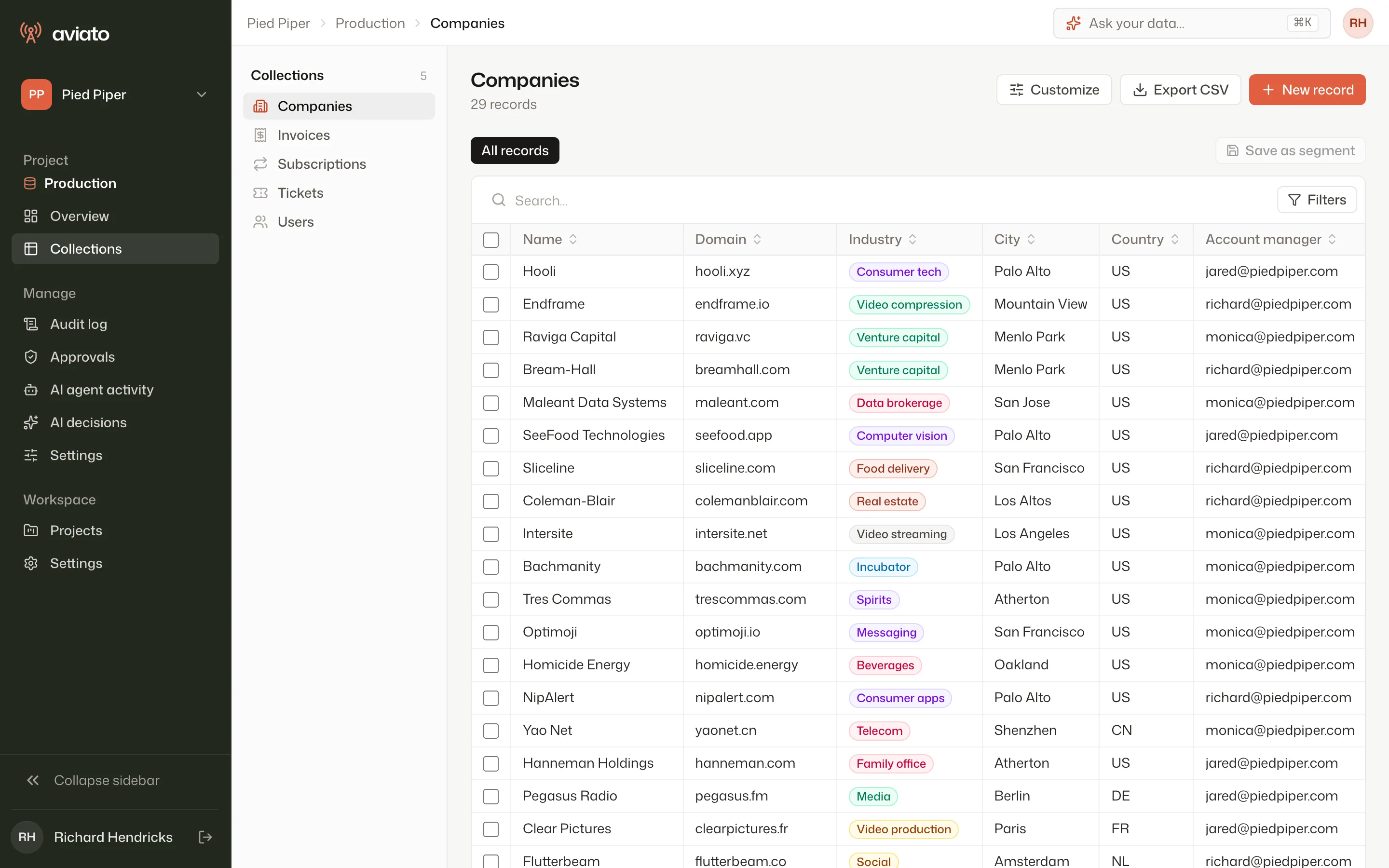
Every screen on this page is a screenshot of the product, running on a sample database: Pied Piper and its customers, from HBO’s Silicon Valley.

Aviato’s back-office listing Pied Piper’s companies: Hooli, Endframe, Raviga Capital and others, with industry badges and account managers.
The companies table of Pied Piper’s database. Badges, labels and the column order are set in Customize, no code written.

02 / A morning at Pied Piper

One double charge, from the ticket to the audit trail.

Endframe was charged twice. Here is how Pied Piper handled it, screen by screen.

  1. 01

    The ticket lands on the customer page

    “Invoice charged twice this month.” Richard opens Endframe in the back-office: invoices, subscription and tickets on one page, read live from Pied Piper’s database.
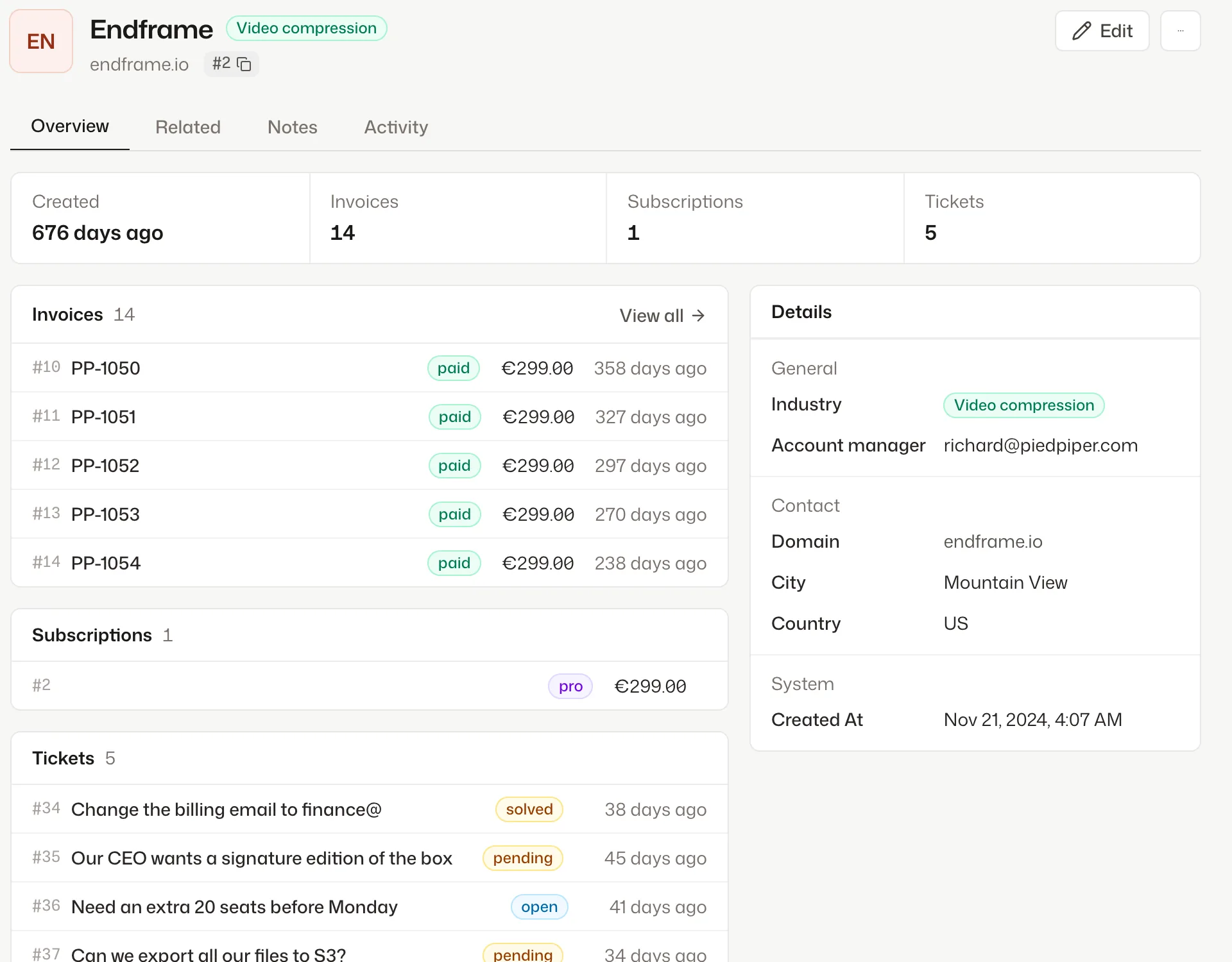
    Endframe’s company page in Aviato, with its invoices, subscription and support tickets.
  2. 02

    Claude Code looks into it

    Through MCP, Claude Code lists Endframe’s invoices, finds PP-1062 and PP-1063 charged one second apart, and asks to refund the second one. Each call is part of the run.
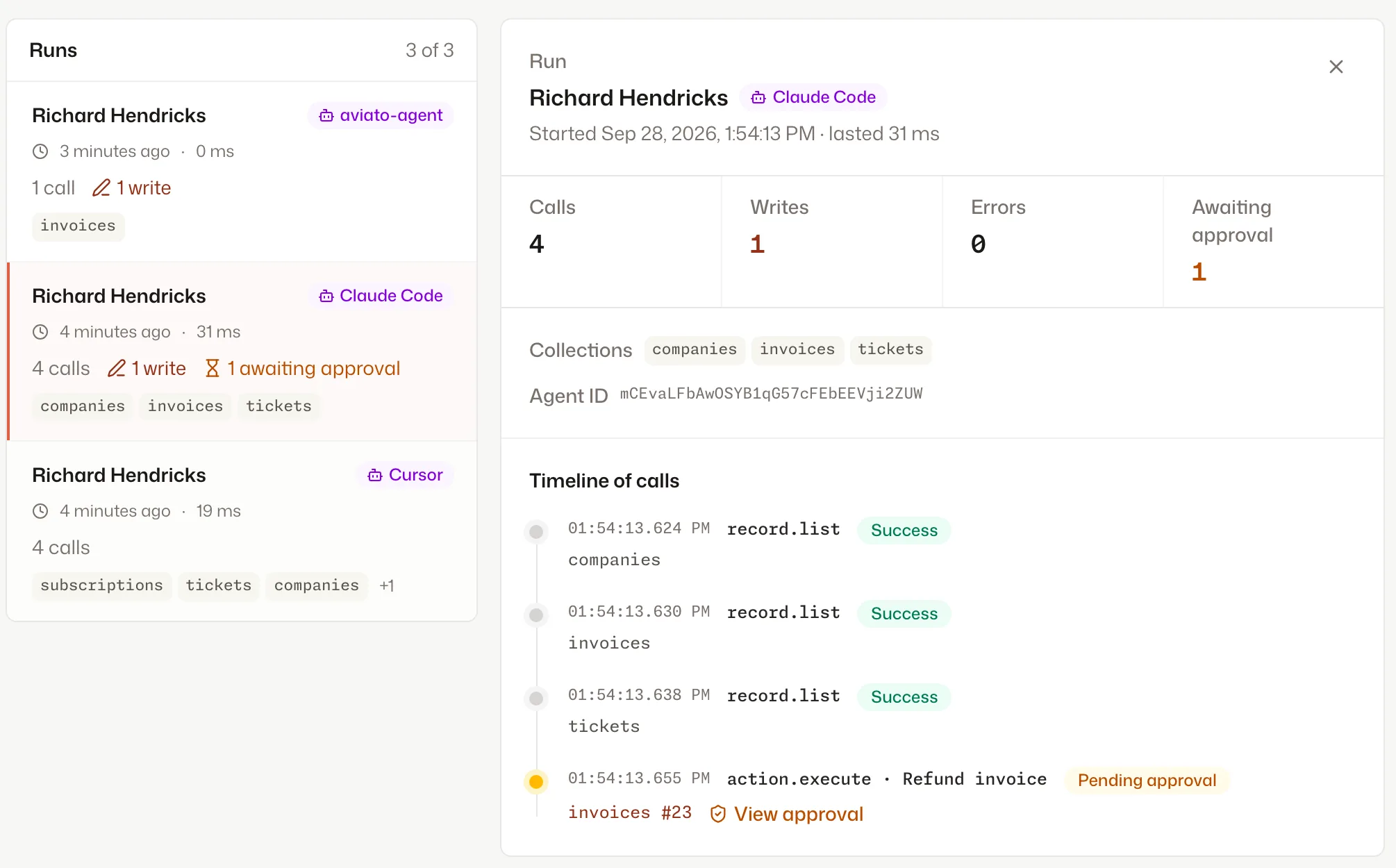
    The AI agent activity page: a Claude Code run with three reads and a refund waiting for approval.
  3. 03

    The refund waits for a human

    Refunds by AI agents go through the risk check. The action is held with its form values until someone with the right role approves it, with a comment.
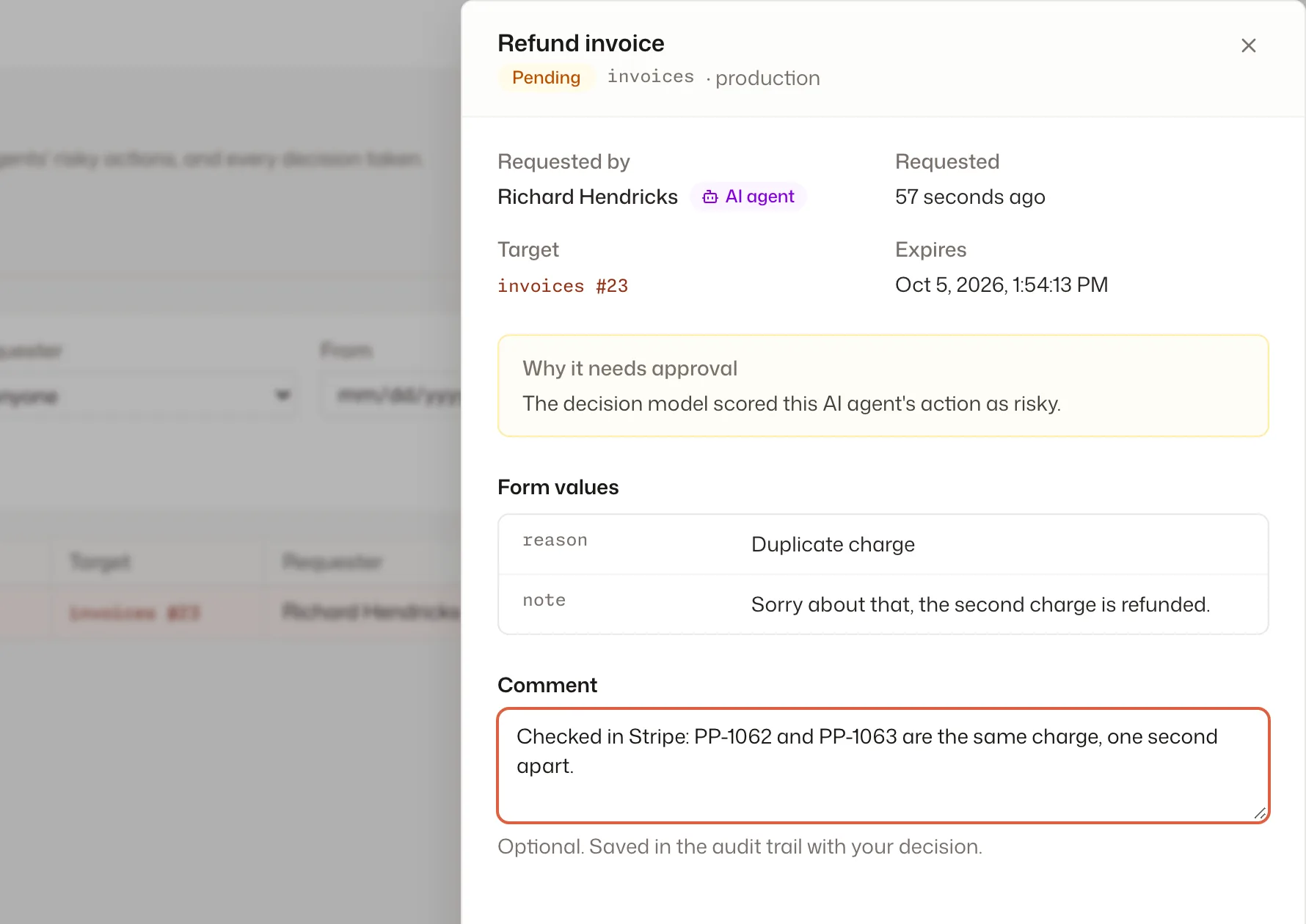
    The approval drawer for the refund request, with the reason, the form values and a reviewer’s comment.
  4. 04

    Approved, run, recorded

    Richard approves. The refund runs with his identity, and the audit log keeps every step: the AI agent’s reads, the request, the approval, the refund.
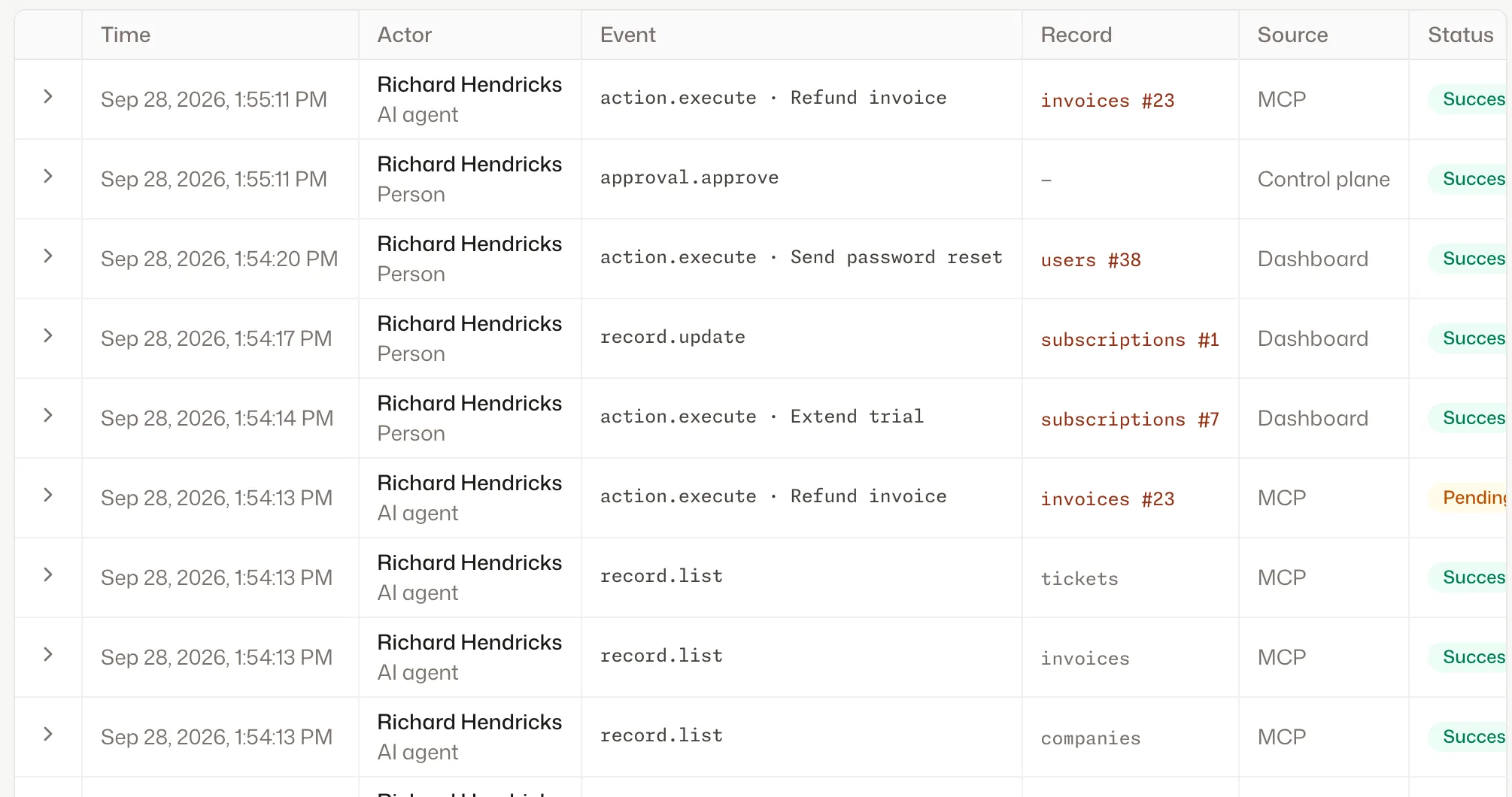
    The audit log with the refund executed through MCP after Richard’s approval, next to his own actions in the dashboard.

03 / How it works

Three steps to your own back-office.

Run the connector next to your database, add your own actions when you need them, and connect your AI agents.

  1. 01

    Connect your database

    One container and a connection string. The connector reads your tables and relations; collections and your charts show up on their own.

  2. 02

    Add your own actions

    Refunds, trial extensions, exports: write them in your code with the TypeScript SDK or the Laravel package. Your team gets a form, your agents get a tool.

  3. 03

    Connect Claude or Cursor

    Each project has its own MCP endpoint. One command, an OAuth sign-in, and the AI agent acts with your permissions.

04 / Safe by design

Your records go straight from your servers to your browser.

The dashboard talks to the connector directly, and the connector runs next to your database, in your infrastructure. The records your team reads and edits never go through our servers.

  • Browser to connector, directly: no records transit through Aviato
  • Our servers never connect to your database
  • Aviato’s cloud handles sign-in, roles and the audit trail, and you choose what the trail keeps
See exactly what goes where
Every change keeps its before and after values.

05 / What you don’t build

The admin panel you won’t have to write.

An internal admin starts as a few CRUD screens and turns into a project of its own. With Aviato, you don’t build or maintain:

  • CRUD screens for every table, with search, filters and relations
  • Permission checks, down to rows and fields
  • An audit log with before and after values
  • An approval flow for sensitive actions
  • SAML and OIDC single sign-on
  • An authenticated MCP server for your AI agents
Explore use cases

A few things worth knowing

Good questions. Clear answers.

What does Aviato do?

Aviato connects to your database and gives your team a ready-to-use back-office: browse and edit records, run custom actions, build dashboards. The same data is available to your AI agents through MCP, under the same permissions and audit trail.

Which databases does it work with?

PostgreSQL (Supabase and Neon included), MySQL, MongoDB, SQLite and Turso. One connector can serve several databases, and your own code adds actions, computed fields and segments on top.

Does my data leave my infrastructure?

You choose. Run the Aviato connector next to your database and your records never leave your infrastructure, or let us host it for you. You also decide, field by field, what the audit trail keeps.

How much control do I have over AI agents?

Each agent gets a role, like a teammate: what it can see, which actions it can run, which records it can touch. Sensitive actions can require human approval, and every call is recorded in the audit trail.

Are SSO and the audit trail really included?

Yes. The audit trail and SSO (SAML and OIDC) come with every plan, Free included. Retention and capacity grow with your plan, not the feature list, and never with a sales negotiation.

Start with one database

Connect your database. Open your first record today.

Free for 3 users and 1 project. Pro is €49 a month, or €39 billed yearly.

Get started